


27/09/24 - Current Reaper Workflow
- Oliver Nixon
- Oct 24, 2024
- 2 min read

With today's blog post I'd like to dive into my Reaper workflow by looking at how I set up a new project with a template, my screensets/layouts, some go to plug-ins and scripts.
For about 6-months I have been working with the Reaper layout pictured below, I was heavily inspired by sound designer Noah Sitrin's Reaper workflow that they highlighted in a YouTube video and Stephen Schappler's blog on their workflow, I took their main ideas and made them my own.
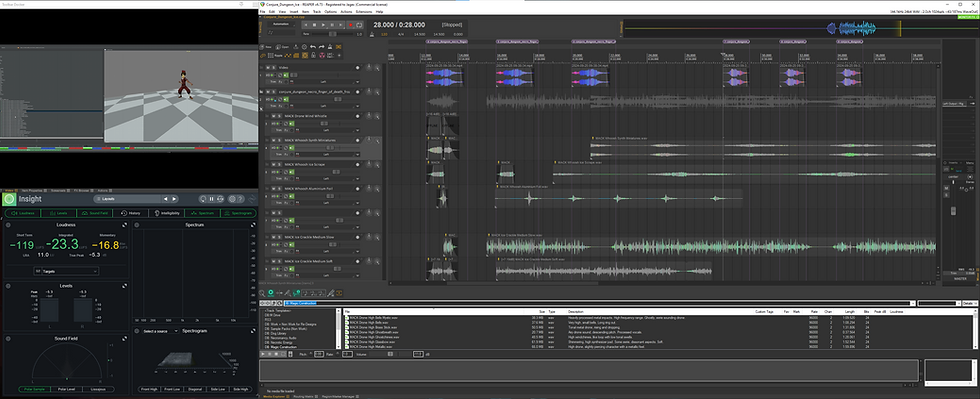
I work off a single 30-inch curved monitor, I used to have two smaller but I much prefer the one, larger screen. I always start a new project from my sound design template, the main timeline has a video track and a main mix master track with a few tracks pre grouped so I can get started right away. Starting at the bottom of the screen, I have my Media Explorer that is linked to a few different drives, a few network drives through work VPN and my personal library. This part of the screen also has the routing matrix and the region render matrix, they're screens I only use when batch exporting so aren't used often.

On the right I have the mix window collapsed to just the master, this way I can quickly monozie the master, I don't often put any plug-ins on my master and prefer to use the super handy FX:Monitor function.
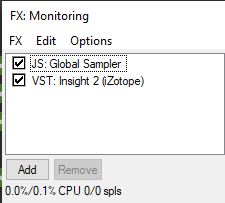
The FX:Monitor has two plug-ins by default, Bird Bird's Global Sampler and Izotope Insight which can both be seen above. These are probably my most used plug-ins as Insight is great for checking my levels and Global Sampler is simply a must in creative sound design, I love messing with plug-in chains and saving the output with a simple drag and drop rather than a laborious export.
I often use the GTA style 'Radial Menu' for quickly adding plug-ins to items or tracks, I have it set to hold 'Q' as it feels natural from a gamers perspective. It has literarally every default shortcut within it and it is fully customisable, I mainly use it for plug-in adding however. I have it set as LMB is a stereo plug-in add and RMB is the mono version.

NVK's amazing, and free, script 'variator' always makes an appearance when I'm doing variations of sounds, which is basically always. I have it as a button on my tool bar and it is also assigned to Shift+F12.

I think that pretty much sums up my work flow without deep diving into the plug-ins I use which is being saved for another blog. These are the things I have added to Reaper from inspiration from other, usually much more experienced, sound designers. I use SWS extensions, reapack, batch exporting, normalising, batch naming etc, all the usual time saving hacks that are standard in this industry.
Hope you enjoyed looking at my workflow, anything I have used is linked below!
Peace,
Oliver.
PS the work shown in screenshots is work released long ago for Runescape with no secrets or NDA materials shown.
Links:
Bird Bird Global Sampler: https://forum.cockos.com/showthread.php?t=260576
Noah's Reaper layout: https://www.youtube.com/watch?v=r2iLaa50Gww&t=9s
Stephen Schappler: https://www.stephenschappler.com/2024/09/12/my-reaper-environment-for-sound-design/
Radial Menu: https://forum.cockos.com/showthread.php?t=186637

Comments